

Software Localization Services

Product and engineering teams use our software localization services to ship SaaS platforms, enterprise systems, and mobile apps in more languages. Native linguists translate, a second linguist checks, and we test in context before release.

  • Since2007
  • languages500+
  • linguists10,000+
  • software file formats25+
  • ISO 17100:2015 translation services
  • ISO/IEC 27001:2022 information security management
  • SOC 2 Type II

Get a Software Localization Quote

Tell us your languages, volume, and deadline.

Languages *
From
To
  • ISO 27001 Certified
  • NDA-Backed Confidentiality

Trusted by Product and Engineering Teams Worldwide

Companies in technology, finance, media, and retail send us their language work.

  • Samsung, a Day Translations client
  • Dell, a Day Translations client
  • Bank of America, a Day Translations client
  • HBO, a Day Translations client
  • H&M, a Day Translations client

Why Software Releases Break in Translation

Most localization failures don’t start with a bad translator. They start upstream, when strings leave the repository without the context that gives them meaning. They surface downstream, after the build. By then, a fix costs an engineer’s afternoon instead of a linguist’s minute. Here’s where we see releases slip, and what we do about each point.

Strings Arrive Without Context

A translator opens a file and sees “Apply” on line 412. Is it a button that submits a form, a filter on a search page, or a status that says a coupon was applied? In German, French, and Japanese, those are three different words. Without a screenshot, a string ID, or a developer comment, the linguist guesses, and the guess ships.

When a product is too large or too confidential to hand every linguist a test login, translators work in a vacuum. Our scoping step finds missing context before translation starts, and our in-context review catches what scoping misses.

Code Breaks When Placeholders Get Touched

Resource files carry more than words. Variables such as {count} or %s, HTML tags, escape characters, and keys have to come back exactly as they went out. Move a placeholder, translate a key, or drop a closing tag, and the app throws an error or prints raw code to the user.

Hard-coded text and sentences built by stitching strings together cause the same trouble in another form. The first can’t be translated at all. The second forces English word order onto languages that don’t share it.

Bugs Surface After the Build

A German label runs past its button. Arabic text renders left to right because the layout is never mirrored. A Japanese font falls back to empty boxes. None of these shows up in a translation file. They appear only when the localized strings render on a real screen, which is why our QA works in the live or staged software wherever you give us access.

Translation vs. Localization at a Glance

Translation and localization get used as synonyms, and the difference decides your budget and your scope.

Software translationSoftware localization
What changesText, language to languageText plus layout, formats, locale settings, and cultural references
Typical scopeUI strings, menus, labelsStrings, dates, currencies, units, encoding, RTL mirroring, help content
TestingFile-level reviewIn-context review and localization testing in the build
FitsInternal tools, text-heavy screensAny product a paying user outside your home market will open

If your product shows dates, prices, addresses, or anything that changes by region, translation alone leaves gaps your users will spot on day one.

This matters to buyers on both sides of the table. CSA Research’s 2022 Can’t Read, Won’t Buy B2B findings show that 66% of business users would pay up to 30% more for a localized product. Only 34% of consumers said the same.

Not sure whether your product needs translation or full localization? Walk through it with a project manager first.

What We Localize Inside Your Product

Every string a user reads is in scope, from the first sign-up screen to the error a user sees at 2 a.m. when a payment fails. Your project manager agrees the scope with you line by line, so nothing gets quoted twice and nothing falls through.

  1. UI and UX Strings

    Native linguists who work in software translate the visible interface with an eye on how people read and tap in each language.

    • Buttons, labels, menus, and navigation
    • Tooltips, notifications, and alerts
    • Sign-up flows, walkthroughs, and in-app messages
    • Settings screens, dashboards, and admin consoles
  2. Error Messages, System Prompts, and Transactional Email

    These are the strings that cost the user trust fastest. A vague or mistranslated error message turns a two-minute fix into a support ticket.

    • Front-end and back-end error messages
    • Login, permission, and security prompts
    • Email notifications, receipts, and password resets
    • Validation and status messages
  3. Documentation, API References, and Release Notes

    Your docs use the same glossary as your interface, so a feature called one thing on screen isn’t called another in the manual. Larger documentation programs run through our technical translation services.

    • User guides and administrator documentation
    • API references and developer guides
    • Release notes and changelogs
    • Compliance and regulatory text inside the product
  4. Help Centers and Knowledge Bases

    Support articles get adapted for tone and structure in each locale, then checked against the live UI wording so that step 3 in the article matches the button the user actually sees.

    • Help center articles and FAQs
    • Troubleshooting guides
    • Chatbot and support flow scripts
    • Video scripts and subtitles
  5. App Store Listings

    Store titles, descriptions, and screenshot captions follow each store’s character limits. Full mobile programs, with iOS and Android specifics, sit with our mobile app localization team.

  6. Internationalization Review

    If your product wasn’t built with other languages in mind, we look for the gaps before translation starts, when they’re cheap to fix.

    • String externalization review
    • Locale variables and date, number, and currency formats
    • Character encoding compatibility
    • RTL readiness for Arabic and Hebrew
  7. Formats, Units, and Cultural References

    Words are only part of what a user reads. Dates, prices, and measurements follow local conventions, and some imagery reads differently in another market, so these sit inside the same scope as your strings.

    • Date, time, and number formats, such as DD/MM/YYYY in the UK and MM/DD/YYYY in the US
    • Currencies, units of measure, and weights shown the way local users expect
    • Character encoding for Arabic, Chinese, Japanese, Korean, and Cyrillic scripts
    • Imagery, icons, colors, and references checked for meanings that change by culture

Engineering Safeguards That Keep Your Build Intact

A translated file that won’t compile is worse than no file at all. Our project managers and linguists treat resource files as code, and the checks below run before anything goes back to your repository.

  1. Protected Variables, Tags, and Keys

    Placeholders such as {count}, %1$s, and {{user_name}}, HTML and XML tags, and string keys have to come back exactly as they went out. Our linguists translate the words around them and leave the code untouched, and the internationalization review in step 2 checks that every variable is handled correctly before translation starts.

  2. Flags for Hard-Coded and Concatenated Strings

    When scoping turns up text that lives in code instead of a resource file, or sentences assembled from fragments, we list each case with its location and send the list to your developers before translation starts. You fix it once. Every future language benefits.

  3. Files Returned in the Structure You Sent

    You get back the same format, encoding, key order, and file names you sent, ready to merge. Our team handles 25+ software formats, including:

    • XLIFF, JSON, PO and POT, RESX, and YAML
    • iOS .strings and Android XML
    • CSV, HTML, and exports from localization management platforms

How Linguists Get the Context They Need

Good context turns a guess into a decision. Our intake asks for it up front, our linguists ask when it’s missing, and every answer is written down so the next release starts from it.

  1. What We Ask for at Kickoff

    The more of this you share, the fewer questions come back to your team mid-sprint:

    • Screenshots, design files, or a staging build

    • String IDs and developer comments

    • Character limits for buttons, labels, and push notifications

    • Your existing glossary, style guide, and translation memory

    • Target locales, including regional variants such as Latin American Spanish or Canadian French

  2. How Questions Get Answered

    When a linguist hits an ambiguous string, the question goes to your project manager, your single point of contact, and your answer goes back to the linguist. Approved answers go into the project glossary and style guide, which your linguists work from on every release.

  3. Why This Lowers Your Cost over Time

    Every approved decision becomes a term or a translation memory match. The second release reuses what the first one settled on, and translation memory matches cost less than new words.

Send a sample resource file and we’ll come back with a scoped price, a timeline, and any internationalization flags we spot.

Our Six-Step Software Localization Process

Poor translation isn’t what sinks most localization projects. A loose process does: strings get missed, linguists work blind, and QA happens after the release candidate is cut. Here is what happens from the moment you send files, who does each part, and what you hold at the end of every step. One project manager runs all six.

  1. Step 1: Scope and File Analysis

    You send resource files, target locales, and your release date. Your project manager reviews the file set, counts new and repeated words, and looks for encoding problems, missing context, and strings that aren’t ready for translation.

    What you get: A scoped brief, a confirmed timeline, a price, and one named contact.

  2. Step 2: String Preparation and Internationalization Review

    We check that strings are externalized, variables are handled correctly, and the files are structured for clean translation. Anything that will break later, such as concatenated sentences or hard-coded text, goes on a flag list for your developers now.

    What you get: A translation-ready file set and a list of internationalization flags for your team.

  3. Step 3: Translation by Native Software Linguists

    Native-speaking linguists with software experience translate your strings, working from a project glossary and style guide from the first string. Ambiguous strings go back to you as questions, not guesses.

    What you get: Translated files and a translation memory and glossary that grow with every release.

  4. Step 4: Independent Revision and In-Context Review

    A second native linguist revises the full translation for accuracy, tone, and consistency, then reviews it in context. For markets with specific cultural expectations, such as the Middle East, Japan, or Brazil, the review covers imagery, idioms, and register. This two-linguist model is what ISO 17100:2015 requires for translation services, and it applies to every human translation project we run.

    What you get: A translation checked by two independent native linguists before it reaches you.

  5. Step 5: Linguistic QA and Localization Testing

    Testers check the localized strings in your live or staged environment wherever you grant access. They look for truncated labels, overflowing text boxes, misaligned RTL layouts, broken encoding, and terminology drift between screens. Full test cycles, including functional and cosmetic checks, run through our localization testing team.

    What you get: A QA report, a resolved issues log, and files ready to merge into your build.

  6. Step 6: Delivery, Integration Support, and Updates

    Files come back in your format with integration support for your developers. When the next sprint ships new strings, your translation memory is already built, so updates move faster and cost less than the first round.

    What you get: Merge-ready files and a team that already knows your product for the next release.

Have a release date in mind? Tell us the date and the locales, and we’ll map these six steps against it.

One Release or Every Sprint: Pick the Engagement Model

The right model depends on how your product ships. A one-time launch and a weekly release train need different staffing, pricing, and handoffs, so we set them up differently.

Project-Based Localization

This model fits a defined scope with a start and an end. Common cases:

  • A new product launching in its first set of languages
  • A major version with a large string change
  • Adding a new market, such as Brazil or Korea, to an existing product
  • A legacy desktop product with years of old strings and installer text

You get one scoped quote, one timeline, and one handover. The translation memory and glossary built during the project belong to you and carry into the next phase whenever you start it.

Continuous Localization for Agile Teams

SaaS teams change strings every week. In a continuous arrangement your project manager stays assigned, the same linguists stay on your account, and new or changed strings move into translation each sprint without a fresh quote every time. Translation memory keeps repeated strings consistent and priced as matches.

This model suits teams that ship on a fixed cadence and want localized releases to go out with the English one, not weeks behind it.

How Pricing Works in Either Model

We price software localization per source word. The rate depends on the language pair, the subject matter, and whether the scope includes testing and engineering checks. Repeated strings and translation memory matches cost less than new words, so each release after the first costs less per word. Volume pricing and NET30 billing are available on enterprise contracts.

The fastest route to an accurate number is a sample of your real files. We don’t send ballpark figures that change once the work starts.

Where AI Speeds Up the Work and Where Linguists Decide

Procurement and security teams want to know how a vendor uses AI. Here’s the straight answer: AI assists the workflow, and a person reviews every word that ships.

What AI Does on Your Project

Our team uses AI-assisted tagging and quality workflows to prepare files and flag issues for reviewers. AI never translates your product on its own.

What Stays with Human Linguists

Translation decisions, revision, and sign-off stay with native linguists. We don’t run autonomous machine translation on your product. Every string, from a button label to a consent notice, is reviewed by a person before it ships. If you want machine translation post-editing for lower-risk strings to cut cost, our AI post-editing team sets that up as a separate, clearly labeled workflow.

Security for Unreleased Products and Source Files

Your resource files describe features that haven’t launched. Treat our security answers as part of the vendor review, and ask for the evidence. The controls below are the ones we run today.

Certifications and Audits

  • ISO/IEC 27001:2022 information security management, audited annually by an accredited third-party body

  • SOC 2 Type II covering security, availability, and confidentiality controls

  • Processing under EU data-protection rules, with a Data Processing Agreement on request

  • A Business Associate Agreement on request for HIPAA-covered healthcare software

How Your Files Are Protected

  • AES-256 encryption at rest and TLS 1.3 in transit

  • Zero-trust access with multi-factor authentication and role-based permissions on a least-privilege basis

  • Around-the-clock monitoring with real-time alerts and complete audit trails

  • Region-specific storage, so EU data stays in the EU

  • Cloud hosting with automated backups and disaster recovery

People and Paperwork

Every linguist and staff member signs a non-disclosure agreement before touching client files, and the whole team completes security awareness training and phishing simulations every quarter. For stricter requirements, our linguists work inside your own secure VPN or content system instead of moving files out of it.

Security overviews, certificates, and agreement templates are available through our Trust Center.

Software Types and Industries We Localize For

A SaaS dashboard on a modern stack has little in common with firmware on a medical device. The product type sets the file formats, the review depth, and the testing plan, so we scope each one differently.

A developer pointing at a web app on two monitors while a colleague with a coffee mug looks on, a SaaS release whose new strings go into translation each sprint.

SaaS and Web Platforms

Fast release cycles, frequent string changes, and a translation memory that has to stay in step with the product. After the first launch, a continuous arrangement keeps new strings moving into translation each sprint.

  • Work alongside your existing localization management setup
  • Consistent terminology across every update
  • New languages added as your market grows
An engineer highlighting a tabbed glossary binder beside a setup wizard on his monitor, the multilingual glossary built before desktop and enterprise software is translated.

Desktop and Enterprise Systems

Desktop software carries legacy strings, installer and setup wizard text, and platform conventions that differ between Windows and macOS. ERP and other enterprise systems bring high string volumes and process terms that must read the same in every subsidiary, so we build a multilingual glossary and style guide before translation starts.

  • Installer and setup wizard text, plus platform-specific UI convention review
  • Legacy string cleanup and glossary management for long-lived products
  • High-volume string management for ERP and back-office systems
  • Compliance and regulatory text adapted for each market
A tester comparing the same app screen on two phones with a laptop open behind them, checking that translated strings fit a mobile app's tight character limits.

Mobile Apps

Tight character limits, push notifications, and store listings. We handle iOS .strings and Android XML files directly and pass full mobile programs to our app localization team.

  • App store listing and metadata localization
  • Push notification and system message text
  • String length and character limit review
  • Direct handling of iOS .strings and Android XML files
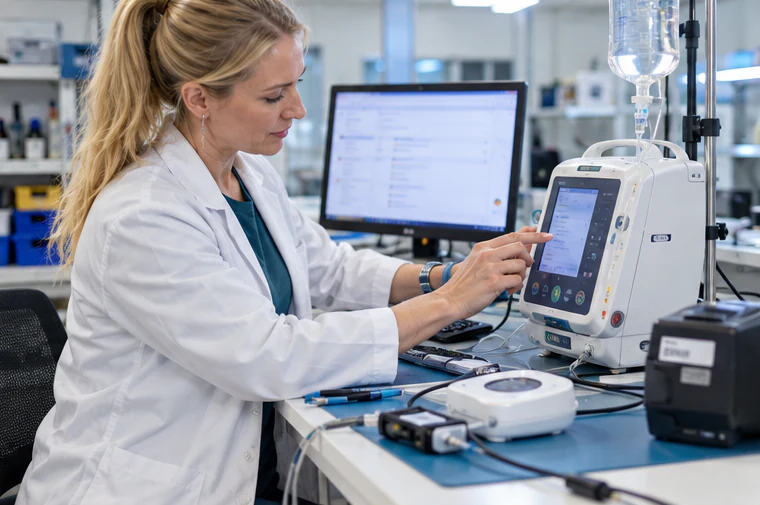
A specialist in a lab coat testing the touchscreen of a medical infusion pump on a lab bench, device software whose built-in regulatory text gets a separate accuracy review.

Embedded, IoT, and Medical Device Software

Control panels, connected devices, industrial systems, and medical device interfaces run in safety-critical settings where a mistranslated warning is a real risk. Linguists with subject-matter background handle these strings, and the regulatory text inside the product gets a separate accuracy review.

  • Medical device and healthcare software
  • Industrial control and manufacturing systems
  • Consumer electronics and smart home devices
A localization tester holding a controller and checking a game's menu and HUD on a monitor, the in-game text translated with its tone and humor intact.

Games

UI, HUD, menus, item names, achievements, and in-game dialogue that has to keep its tone and humor. Larger titles run through our gaming localization team.

Two colleagues reviewing a tablet and a laptop over a stack of tabbed compliance documents, regulated software localized by linguists matched to the industry.

Regulated Industries

Linguists are matched to your industry as well as your language pair. We localize patient portals and clinical tools for healthcare, trading and banking apps for financial services, contract and compliance platforms for legal teams, and LMS interfaces and assessments for eLearning. Retail, logistics, manufacturing, and government software teams work with us too.

What that matching covers in each sector:

  1. Healthcare: Patient portal and EHR interfaces, clinical workflow and decision support tools, embedded device software, and regulatory documentation
  2. Financial services and fintech: Trading and investment platforms, mobile banking and payments apps, insurance and claims software, and regulatory disclosures
  3. Legal and compliance: Contract and document management platforms, compliance monitoring and reporting tools, case management software, and privacy and consent interfaces
  4. eLearning and EdTech: LMS interfaces and course navigation, assessments and quizzes, instructor and student documentation, and certification content

Complex Scripts and Regional Variants

Some languages change the layout, not only the words. These are the locales where in-context testing earns its cost.

Arabic and Hebrew

The whole interface mirrors: navigation, icons with direction, progress bars, and alignment. Mixed strings that combine Arabic or Hebrew with English product names, numbers, or URLs need bidirectional handling so they don’t scramble on screen.

  • Full RTL layout review and mirroring checks

  • Bidirectional text handling for mixed strings

  • Arabic numeral and date format adaptation

  • Guidance on Modern Standard Arabic versus Gulf or Egyptian Arabic for your audience

Chinese, Japanese, and Korean

CJK localization brings character encoding, font rendering, and input method compatibility. Simplified Chinese for Mainland China and Traditional Chinese for Taiwan and Hong Kong run as separate workflows with separate linguists. Japanese needs the right honorific register for business software. Korean word endings change string length unpredictably, so UI testing matters.

Regional Variants That Change Your UI

Latin American and European Spanish differ in vocabulary and form of address, and our team advises on which one fits your market. Brazilian and European Portuguese split the same way. Canadian French differs from European French in software terminology, so French for a Montreal user and French for a Paris user get separate reviews.

German runs longer than English, so buttons and labels get a layout review. Need a language not listed here? Your project manager confirms coverage and the right variant during scoping.

Why Product Teams Choose Day Translations

Every vendor promises native linguists and fair prices. The differences show up later: who answers when a string breaks the build, whether the reviewer knows your product, and what you own when the contract ends. Here is how we answer those.

A product team at two monitors showing code and app screens, one holding up a phone, the kind of team that reaches a person when a string breaks the build.
  • A Second Linguist on Every Project

    ISO 17100:2015 requires independent revision by a second qualified linguist, and our certified process applies it to every human translation job, not only the premium tier. Your strings are read by two native speakers before they reach you.

  • One Project Manager from Kickoff to Every Update

    A single named project manager owns your account, knows your glossary, and answers your questions. You won’t be passed between departments or asked to re-explain your product each release.

  • Your Stack, Your Formats

    No proprietary portal is forced on you. Our linguists work in your localization management platform, in our Smartcat TMS with locked terminology glossaries, or straight from the files your developers export. When your website launches alongside the product, our website localization team works from the same glossary.

  • Translation Memory That Cuts Update Costs

    Every approved string goes into a translation memory that belongs to you. Repeated and matched strings are priced below new words, and the gap widens with each release.

  • Coverage Around the Clock

    Project managers cover every time zone, 24 hours a day, 7 days a week. A release going out of San Francisco on Friday night and a hotfix from Singapore on Monday morning reach a person, not a queue.

Certifications with the Detail Attached

Certifications name their standard, version, and scope, so your vendor review doesn’t stall on a vague badge.

CertificationVersionScope
ISO 171002015Translation services: translator qualifications, revision, and project management
ISO/IEC 270012022Information security management system, audited annually by an accredited third-party body
SOC 2Type IISecurity, availability, and confidentiality controls

Professional memberships are separate from certification: American Translators Association (corporate member since 2007), Association of Translation Companies, Globalization and Localization Association, and New York Circle of Translators. Day Translations also holds an A+ rating from the Better Business Bureau.

Software Localization Services FAQs

These are the questions software buyers ask on a first call, answered directly.

Still unsure? An expert answers 24/7/365.

Call an expert

Plan Your Next Release with Our Localization Team

Product, engineering, and localization leads get the same thing from the first call: a project manager who reads your files, asks about your release date, and comes back with a scope you can take to procurement. Send a sample of real strings. The price, timeline, and internationalization flags arrive with it.

Ready to scope your next locale? Choose the next step that fits where you are.

Carla is a Customer Support Representative dedicated to making multilingual communication seamless for healthcare, legal, government and global enterprises. She coordinates translation, localization and interpreting services in over 500 languages 24/7.Request a Project QuoteCarla Moxam